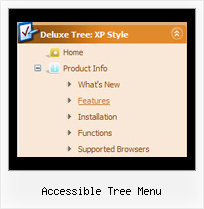
Accessible Tree Menu by Deluxe-Tree.com
Accessible Tree Menu


Buy Now!  Free Trial Download

Menu Screenshots Accessible Tree Menu

Accessible Tree Menu State Pulldown Tree

Features Accessible Tree Menu

Seamless Integration
  • Visible over flash, select boxes, iframes, java applets
  • Multiple menus on the same page
  • Amicable to other scripts and css styles
  • Any HTML code can be used inside menu items
Compatibility              
  • Full cross-browser compatibility including IE, Netscape, Mozilla, Opera, Firefox, Konqueror and Safari on Windows, Mac OS and Linux
  • Menu can be populated from a database using ASP, PHP, etc.
  • Search engine friendly
  • Support for any doctypes
  • Fits for secure sites
Slide Down Menu Tree View Accessible Tree Menu
Unrivalled Features
  • Scrollable, dragable, floating
  • Unique Java Script API for altering menu "on-the-fly", without page reloading
  • AJAX technology - loads menu data from the server "on-fly and on-demand".
High Performance
  • AJAX menu loading - loads web menu data from the server "on-the-fly".
  • Commonly loads quicker than other html page elements
  • Runs well with an unlimited number of submenus and items
Easy Setup
  • De Luxe Tuner. GUI interface to create your accessible tree menu menus easily and in no time
  • Sensible menu parameters for manual editing
Buy Now!  Free Trial Download

Javascript Tree Menu. Expandable Menu.

  • You can set default expanded/collapsed items and submenus.
  • After clicking on menu item selected item becomes highlighted.
  • When the submenu is larger than the visible area of the page the submenu will be automatically decreased. To see all the submenu items you do not need to use scrollbars or something like that - just put your mouse to the bottom of a submenu and it will be automatically scrolled! You can also specify height and width for each separate submenu.
  • There is no need to write additional code on a server side to remember what items were expanded/collapsed. Javascript/DHTML Tree can save items state automatically!

Recent Questions Accessible Tree Menu

Q: Do I need any additional loaded software as a visitor to a webplace using the Deluxmenu, for example Java applet, flash etc.?


A: You don't have to install additional software.
Your customer should change security settings in IE to allow Javascript on pages he loads.

When your security settings in IE doesn't allow Javascript onpages you load you can't see a dynamic page content.

There is no way to enable these preferences automatically, in othercase there are no reasons to create security preferences.


Q: I have made use of the Ajax function in JavaScript Tree Menu. It has made maintenance of a rather complex menu system a lot easier.

I went to generate a Site Map in dhtml menu builder today and realized a shortcoming of using Ajax submenus, the Site Map doesn't show Ajax submenus.

It would be great to have an option in the Generate Site Map (as well as Google XML and Google Search) to include Ajax submenus for a complete picture of the web site.

A: Unfortunately there are such problems with saving of AJAX submenus.
It is not possible to save AJAX submenus in Deluxe Tuner now and it is not possible tocreate search engine friendly code and sitemap for the AJAX submenus.

We'll try to add such features in the future versions of Deluxe Tuner.


Q: Your product seems to have menus draw only in a fixed 'hardcoded' direction ( opens either left or right )

is it possible to customize so that it is "self-aware" of the client browser window size...

"if there's room draw to the right, if not, open the menu to the left..."


A: You can see your submenus in any case.
They won't drop down out of the browser window.
Please, check it.

More info about the ways of showing submenus you can find here:

http://deluxe-menu.com/ways-showing-submenus-sample.html


Q: How do I get my existing HTML code inside the rollover tabs?


A: You should paste your content in the <div> .. </div> tags.

<div id="content1" style=" visibility: hidden;" class="tabPage">
<p align=center><img src="img/logo_DM.gif" width=262 height=56 alt="Deluxe-Menu.com"></p>
</div>

<div id="content2" style="visibility: hidden;" class="tabPage">
<p align=center><img src="img/logo_DT.gif" width=262 height=56 alt="Deluxe-Tree.com"></p>
</div>

<div id="content3" style=" visibility: hidden;" class="tabPage">
<p align=center><img src="img/logo_DTabs.gif" width=254 height=58 alt="Deluxe-Tabs.com"></p>
</div>

See in Deluxe Tabs there are two modes:

1.   var tabMode=0;
You can create only one level of tabs and assign Object Id's of theDIV's to show when you click on the tab.

["XP Tab 1","content1", "", "", "", "", "", "", "", ],
["XP Tab 2","content2", "", "", "", "", "", "", "", ],
["XP Tab 3","content3", "", "", "", "", "", "", "", ],
["XP Tab 4","content4", "", "", "", "", "", "", "", ],

2.   var tabMode=1;
You can assign only links in this mode.
You should create top level items with subitems.

["XP Tab 1","", "", "", "", "", "", "", "", ],
 ["|Link 1_1","http://deluxe-tabs.com", "", "", "", "", "0", "", "", ],
 ["|Link 1_2","testlink.htm", "", "", "", "", "0", "", "", ],
 ["|Link 1_3","testlink.htm", "", "", "", "", "0", "", "", ],
 ["|Link 1_4","testlink.htm", "", "", "", "", "0", "", "", ],
 ["|Link 1_5","testlink.htm", "", "", "", "", "0", "", "", ],
["XP Tab 2","", "", "", "", "", "", "", "", ],
 ["|Link 2_1","testlink.htm", "", "", "", "", "0", "", "", ],
 ["|Link 2_2","testlink.htm", "", "", "", "", "0", "", "", ],
 ["|Link 2_3","testlink.htm", "", "", "", "", "0", "", "", ],
 ["|Link 2_4","testlink.htm", "", "", "", "", "0", "", "", ],
 ["|Link 2_5","testlink.htm", "", "", "", "", "0", "", "", ],
["XP Tab 3","", "", "", "", "", "", "", "", ],
 ["|Link 3_1","testlink.htm", "", "", "", "", "0", "", "", ],
 ["|Link 3_2","testlink.htm", "", "", "", "", "0", "", "", ],
 ["|Link 3_3","testlink.htm", "", "", "", "", "0", "", "", ],
 ["|Link 3_4","testlink.htm", "", "", "", "", "0", "", "", ],
 ["|Link 3_5","testlink.htm", "", "", "", "", "0", "", "", ],

You can use Object ID as well as Link in both modes.
Use the following prefixes within item's link field:

"object:" - means that there is object id after it;
"link:" - means that there is a link after it.
"javascript:" - means that there is a javascript code after it, for example:javascript:alert(\'Hello!\')

So, you should write for example:

 ["|Link 1_1","object:Content1_1", "", "", "", "", "0", "", "", ],