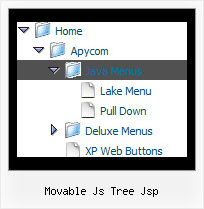
Movable Js Tree Jsp by Deluxe-Tree.com
Movable Js Tree Jsp


Buy Now!  Free Trial Download

Menu Screenshots Movable Js Tree Jsp

Movable Js Tree Jsp Tree Menu Pop

Features Movable Js Tree Jsp

Unrivalled Features
  • Scrollable, dragable, floating
  • Unique Java Script API for altering menu "on-the-fly", without page reloading
  • AJAX technology - loads menu data from the server "on-fly and on-demand".
Cost Effective
Vertical Tree Menu Movable Js Tree Jsp
High Performance
  • AJAX menu loading - loads web menu data from the server "on-the-fly".
  • Commonly loads quicker than other html page elements
  • Runs well with an unlimited number of submenus and items
Professional Look-n-feel
  • Entirely customizable look-n-feel
  • A lot of pre-designed movable js tree jsp samples
  • Hundreds of visual effects
  • Custom CSS styles can be applied for all menu settings
Compatibility              
  • Full cross-browser compatibility including IE, Netscape, Mozilla, Opera, Firefox, Konqueror and Safari on Windows, Mac OS and Linux
  • Menu can be populated from a database using ASP, PHP, etc.
  • Search engine friendly
  • Support for any doctypes
  • Fits for secure sites
Buy Now!  Free Trial Download

Javascript Tree Menu. Expandable Menu.

  • Use a mouse to move a menu as a usual window.
  • When the page is scrolled the menu remains visible. The menu can "float" along one or two coordinate axes. After clicking on menu item selected item becomes highlighted.
  • There can be as many submenus as necessary. Any submenu in its turn can include different number of columns.

Recent Questions Movable Js Tree Jsp

Q: I am struggling with my menu on my site the submenu is under the main text area. How do I make the submenu come to the front.


A: Check your z-index for <DIV id=navigation>.
Try to write it, for example, so:

<DIV id=navigationstyle="Z-INDEX: 10; LEFT: 0px; WIDTH: 170px; POSITION: absolute; TOP: 5px; HEIGHT: 600px">

Try that.


Q: 1) Can any HTML be inserted in to the text?

2) As the item has no link, how can I prevent the item being highlighted on mouseover?


A: 1) Yes, you can insert any html code within menuItems, for example:

 ["|You can place <b>any HTML code</b><br> to item, for example <u>image</u>:<br><img src=img/logo.gif>","testlink.html"],
 ["|Index  <select style='width:120px;height:17px;font:normal 10px Tahoma,Arial;'><option>Section 1<option>Section 2<option>Section 3</select>", "", "", "", "", "", "", ""],
 ["|Search <input type=text style='width:80px;height:17px;font:normal 10px Tahoma,Arial;'>  <input type=button value='Go' style='width:30px;height:17px;font:normal 10px Tahoma,Arial;'>", "", "", "", "", "", "", "0"],
 ["|Write Us", "mailto:[email protected]", ""],

2) Yes, you can do it.

You should create Individual Style for it.

For example:
  var itemStyles = [
["itemBackColor=#FCEEB0,#FCEEB0","itemBorderColor=,#FCEEB0","fontColor=,#000000"], //style0
];

["Product Info","", "default.files/icon1.gif", "default.files/icon1o.gif", , , "0", , , ], //style0


Q: Very interested by your product.I want to know, before buy, if I can call javascript function when the user click on a items in the horizontal drop down menu?

A: You're able to use Javascript for each item, for example:

  var menuitems = [
["item text", "javascript:your_code_here"]
];

Unfortunately, you can't assign onmouseover/onClick event to each item.
However, you can achieve this by using standard html objects within items, for example:

  var menuitems = [
["<div onClick='your_code_here'>item text</div>", "index.html"]
];

Q: Ever since I installed the menu on our website the homepage loadsslowly.
The menu loads, but then the rest of the page takes about 20 seconds toload. Have you seen this problem before.
It does not happen every time and noton every machine.


A: We've tested your website on the many machines and it loads very quickly, I cannot notice any delays.

Please, try to move the reference to dmenu.js after tag:

<body onload="...">
...

<!-- JavaScript Tree Menu -->
<noscript><a href="http://deluxe-menu.com">Javascript Menu by Deluxe-Menu.com</a></noscript>
<script type="text/javascript">  var dmWorkPath = "";</script>
<script type="text/javascript" src="dmenu.js"></script>
<!-- (c) 2006, http://deluxe-menu.com -->
</span>