Free Ajax Tree Menu by Deluxe-Tree.com
Free Ajax Tree Menu


Buy Now!  Free Trial Download

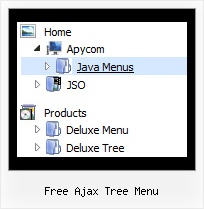
Menu Screenshots Free Ajax Tree Menu

Free Ajax Tree Menu Sliding Tree Menus

Features Free Ajax Tree Menu

Compatibility              
  • Full cross-browser compatibility including IE, Netscape, Mozilla, Opera, Firefox, Konqueror and Safari on Windows, Mac OS and Linux
  • Menu can be populated from a database using ASP, PHP, etc.
  • Search engine friendly
  • Support for any doctypes
  • Fits for secure sites
Cost Effective
Folding Tree Dhtml Free Ajax Tree Menu
High Performance
  • AJAX menu loading - loads web menu data from the server "on-the-fly".
  • Commonly loads quicker than other html page elements
  • Runs well with an unlimited number of submenus and items
Professional Look-n-feel
  • Entirely customizable look-n-feel
  • A lot of pre-designed free ajax tree menu samples
  • Hundreds of visual effects
  • Custom CSS styles can be applied for all menu settings
Easy Setup
  • De Luxe Tuner. GUI interface to create your free ajax tree menu menus easily and in no time
  • Sensible menu parameters for manual editing
Buy Now!  Free Trial Download

Javascript Tree Menu. Expandable Menu.

  • There is no need to write additional code on a server side to remember what items were expanded/collapsed. Javascript/DHTML Tree can save items state automatically!
  • When the submenu is bigger than the visible page area, you can use the scollbar for submenus to scroll your menu!

Recent Questions Free Ajax Tree Menu

Q: The /js subdirectory of the Apycom Tree Menu trial package has no data file, i.e. the data file is missing.

A: This file can be renamed, for example, into tree-data.js.
This file contains Javascript code with menu parameters and items.
It has the following structure:

  var param1 = value1;
  var param2 = value2;
  var param3 = value3;
...
  var tmenuItems = [...];

Please, check that.
Use our examples to see how to install the menu.
Use DHTML Tuner application from the same .zip package to create andconfigure your menus.


Q: I'm using your menu for my customers.

IHtml menu script works really great but since your last updates I'm really missing the parameter smviewtype=3, so I can have a subnavigation going other direction as usual.

Since you had this feature build in I choosed your menu and did a lot of programming, to get it integrated into contenido cms system.

I would be very pleased, if you could help me on this point.

A: You should set the way you show submenus using subMenuAlign and subMenuVAlign parameters.See more info here:

http://deluxe-menu.com/ways-showing-submenus-sample.html


Q: I love your product! I used it to create our top level navigation for the initial re-launch of our site in October and am now using Delux-tree to create a left navbar for a secondupdate to our site come Feb. 14th.

I have one question however, is it possible that when I expand "CRM" and then secondly expand "Contact Manager","CRM" then returns back to it's original states drop down menu? Please let me know, thanks!!


A: You should set the following parameter:

  var tcloseExpandedXP=1;


Q: I want that the font of an selected menupoint for the horizontal tree view is bold and red.
What is the variable to define that?


A: Try to use the following parameter:

  var tpressedFontColor = "#AA0000";
// Color of a text of selected items. Used when   var ttoggleMode = 1.


Date: 10.21.2005