Cappuccino Web Tree by Deluxe-Tree.com
Cappuccino Web Tree


Buy Now!  Free Trial Download

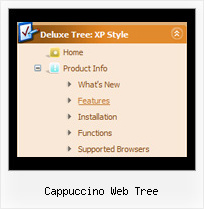
Menu Screenshots Cappuccino Web Tree

Cappuccino Web Tree Display Tree Html Javascript

Features Cappuccino Web Tree

Unrivalled Features
  • Scrollable, dragable, floating
  • Unique Java Script API for altering menu "on-the-fly", without page reloading
  • AJAX technology - loads menu data from the server "on-fly and on-demand".
Compatibility              
  • Full cross-browser compatibility including IE, Netscape, Mozilla, Opera, Firefox, Konqueror and Safari on Windows, Mac OS and Linux
  • Menu can be populated from a database using ASP, PHP, etc.
  • Search engine friendly
  • Support for any doctypes
  • Fits for secure sites
Cascading Menus Tree Cappuccino Web Tree
Cost Effective
Easy Setup
  • De Luxe Tuner. GUI interface to create your cappuccino web tree menus easily and in no time
  • Sensible menu parameters for manual editing
Seamless Integration
  • Visible over flash, select boxes, iframes, java applets
  • Multiple menus on the same page
  • Amicable to other scripts and css styles
  • Any HTML code can be used inside menu items
Buy Now!  Free Trial Download

Javascript Tree Menu. Expandable Menu.

  • There is no need to write additional code on a server side to remember what items were expanded/collapsed. Javascript/DHTML Tree can save items state automatically!
  • When the submenu is bigger than the visible page area, you can use the scollbar for submenus to scroll your menu!

Recent Questions Cappuccino Web Tree

Q: I want to buy your product today, but have a few questions:

How do I change the font style for java menu templates to 9pt Verdana bold, but leave the sub-menus 9pt Verdana normal? I understand there’s a "fontStyle" variable, but is there an "itemfontStyle"? How do I make the left hand padding greater for the menu? I’m using the XP Style 1 and the far left top menu item is running up against my left hand border. I want to add about 10px of spacing to the left of the menu. How do I make the options in a menu have equal spacing? For instance, if there are 5 items in the menu, how can each have 100% / 5?

A: You can use Individual Item styles to set specific parameters for eachitem or submenu.

1.
  var fontStyle=["normal 9pt Verdana","normal 9pt Verdana"]; //for subitems
//style for the top items
  var itemStyles = [
["itemHeight=21px","itemBackColor=#F2F3F2,#1665CB","fontStyle='bold 9pt Verdana','bold 9pt Verdana'"],
];

2., 4. You should specify itemPadding parameter in "px". You shouldadd "px" in your style for subitems:
  var menuStyles = [
["menuBackColor=#F2F3F2","menuBorderWidth=0","itemSpacing=1","itemPadding=4px","smOrientation=undefined"],
];

Notice also that you can set multiple value for itemPadding parameter,for example:

itemPadding=4px 10px 4px 10px
top right bottom left
4. You should set the exact width for the java menu templates:
  var menuWidth="500px";
and set width for the top items using Individual styles:
["itemWidth=100px","itemHeight=21px","itemBackColor=#F2F3F2,#1665CB","fontStyle='bold 9pt Verdana','bold 9pt Verdana'"],

Unfortunately it is not possible to specify item's width in '%' inIndividual styles. The following width parameters won't work.

  var menuWidth="100%";
["itemWidth=20%","itemHeight=21px","itemBackColor=#F2F3F2,#1665CB","fontStyle='bold 9pt Verdana','bold 9pt Verdana'"],


Q: I am using deluxe menus and have a problem with images not downloading when the page loads. Is there a way to instruct the menus to preload the images instead of waiting until a person mouse overs the basic drop down menu for the first time?

I am using images that are called via stylesheet.

A: Please try to add the following basic drop down menu parameter:

  var dm_writeAll = 1;


Q: Is it possible to hide the plus signs so only the icon and the menu text show?


A: Yes, you can do it.
You should write so:

//------- Buttons -------
  var texpandBtn = ["","",""];
  var texpandBtnW = "";
  var texpandBtnH = "";
  var texpandBtnAlign = "left";


Q: How do I center the text in a top menu item in the dhtml menu, so that it is centered in the "box" that is clicked?

A: Try to set the following parameter ('Item Appearance' section in the main window of Deluxe Tuner):

  var itemAlignTop="center";